Best Nanny Cam 2026: 8 Nanny Cams Reviewed
Short answer: The best nanny cam for most families is the Arlo Essential Indoor Camera 2K, 2-Camera Kit (under $100): 2K video, a physical privacy shield and local storage with no required subscription. On a budget, the Wyze Cam v4 (under $50) records to a microSD card; check your state's audio-recording consent law before you rely on two-way audio.
The best nanny cam for most homes is the Arlo Essential Indoor 2K 2-camera kit (under $100): privacy shield, local storage, no required plan. 8 nanny cams compared.

Arlo Essential Indoor Camera 2K, 2-Camera Kit (3rd Gen)
Our #1 nanny cam, sold as a 2-camera kit: 2K video, physical privacy shield, and local storage with no mandatory subscription. Cover the nursery and the playroom in one order.
Check price on AmazonInstalling a home monitoring camera when you have a nanny or home daycare provider is one of the most practical decisions a parent can make, not because nannies are untrustworthy, but because it creates accountability, provides peace of mind, and documents any incidents that require follow-up. The right camera gives you a clear, reliable view of your home environment without becoming a surveillance obsession that damages your working relationship with your caregiver.
We evaluated the top indoor cameras specifically for nanny monitoring and childcare use, focusing on video quality, two-way communication, privacy features, local storage options, and ease of daily use.
Our Top Pick: Arlo Essential Indoor Camera 2-Camera Kit (under $100)
The Arlo Essential Indoor Camera earns the top spot for nanny monitoring because it delivers 2K video, excellent low-light performance for dimly lit nurseries, a privacy shield that physically covers the lens when you are home, and local storage via USB-C, no mandatory cloud subscription. The current listing is a 2-camera kit, which covers the two rooms a caregiver actually uses (nursery plus main living space) in one purchase. The two-way audio is reliable and the app is well-designed for reviewing footage quickly. For parents who want professional-grade monitoring without ongoing subscription costs, the Arlo Essential is the benchmark.
For parents who want a budget entry point, the Wyze Cam v4 at under $50 is our runner-up with surprisingly strong video quality at a fraction of the cost.
The whole-house upgrade: one camera covers one room, and a nanny day moves between the nursery, the kitchen, and the playroom. The eufy Indoor Cam E220 plus S350 Dual-Camera Set (under $250) is the premium tier: a pan-and-tilt 2K camera for the main room plus the 4K dual-lens S350 for the nursery, both with local storage and no mandatory subscription, so the whole main floor is covered in one order instead of one room at a time.

eufy Indoor Cam E220 + S350 Dual-Camera Set
Two cameras in one set: pan-and-tilt 2K plus 4K dual-lens, local storage on both, no required subscription.
Check price on AmazonHow We Chose: What Nanny Cam Selection Actually Requires
Before getting into individual picks, here is what matters specifically for nanny monitoring versus general home security:
Video quality in varied lighting: Nurseries and living rooms have variable lighting throughout the day. You need good performance in both bright daylight and evening lamp lighting, not just "nightvision."
Privacy controls: A physical privacy shield or reliable lens cover is essential for maintaining your caregiver's dignity when you are present. Remote monitoring should feel professional, not invasive.
Easy footage review: You are not watching a live feed all day. The app needs to make it easy to quickly review a specific time window when a concern arises.
Local storage option: Cameras that require cloud subscriptions to access footage older than 24 hours create ongoing costs and privacy concerns. Look for SD card or local storage options.
Audio quality: Two-way audio allows you to communicate with your nanny or check in from work. One-way audio is less useful for active communication.
The 8 Best Nanny Cams and Indoor Cameras at a Glance
| Camera | Budget | Resolution | Local Storage | Privacy Shield | Subscription Required |
|---|---|---|---|---|---|
| Arlo Essential Indoor 2-Cam Kit | Under $100 | 2K | USB/microSD | Yes (physical) | No (with local storage) |
| Wyze Cam v4 | Under $50 | 2.5K | microSD | No | No (with SD card) |
| Google Nest Cam (Wired) | Under $250 | 1080p HDR | Cloud only | No | Yes ($6/mo for history) |
| eufy Indoor Cam E220 2-Cam Kit | Under $250 | 2K | microSD | No | No |
| Logitech Circle View | Under $250 | 1080p HDR | HomeKit Secure | No (HomeKit) | No (with HomeKit) |
| Blink Mini 2K+ | Under $50 | 2K | Local/cloud | No | No (Sync Module) |
| Ring Indoor Cam 2-Pack | Under $100 | 1080p | Cloud only | No | Yes ($4/mo for history) |
| Reolink E1 Pro | Under $100 | 3K (5MP) | microSD/NAS | No | No |
As an Amazon Associate, we earn from qualifying purchases.
Detailed Reviews
1. Arlo Essential Indoor Camera, Best Overall
The Arlo Essential Indoor 2-camera kit is the most complete nanny monitoring setup at under $100 for two cameras. The 2K resolution captures faces and interactions clearly. The built-in color night vision performs significantly better than standard infrared nightvision in low-light nursery conditions. The physical privacy shield is a mechanical cover that moves over the lens, not a software privacy mode, but an actual physical barrier that provides genuine assurance to your caregiver when the camera is "off."
Best for: Most families wanting professional-grade nanny monitoring without ongoing subscription costs.
Watch out for: Full 30-day cloud history requires an Arlo subscription. Local USB storage covers recent footage without a subscription, but requires managing the storage device.
Arlo Essential Indoor Camera 2K, 2-Camera Kit (3rd Gen)
2-camera kit, 2K resolution, physical privacy shield, local storage option
Check price on Amazon2. Wyze Cam v4, Best Budget Camera
At under $50, the Wyze Cam v4 is the most affordable camera on this list that delivers genuinely good video quality. The 2K resolution, color nightvision, two-way audio, and free cloud event storage (12 second clips) cover all baseline nanny monitoring needs. With a microSD card inserted, continuous local recording is available with no subscription. The app is straightforward and the motion detection is reliable.
Best for: Budget-first families, parents wanting multiple camera placements at low cost.

Wyze Cam v4
Budget price under $50, 2K resolution, free cloud events, local recording
Check price on Amazon3. Google Nest Cam (Wired), Best Smart Home Integration
The Nest Cam is the best choice for households already using Google Home or Android devices. The intelligent detection (person vs. pet vs. vehicle) reduces false alert notifications dramatically. Video quality is 1080p HDR with excellent color accuracy. The main limitation is that footage history beyond 3 hours requires a Google Home Aware subscription ($6/month). For parents who are already in the Google ecosystem and want seamless integration with other smart home devices, the Nest is the smoothest experience.
Best for: Google Home users, families wanting smart event detection to reduce notifications.

Google Nest Cam Indoor (Wired, 3rd Gen)
Google Home integration, HDR 1080p, intelligent person detection
Check price on Amazon4. eufy Indoor Cam E220 2-Cam Kit, Best Value Two-Room Coverage
The eufy Indoor Cam E220 2-Cam Kit provides two pan-and-tilt 2K cameras, two-way audio, motion detection, and local microSD storage for under $250 total with no required subscription. eufy's local-first architecture means footage stays on your device rather than uploading to a cloud server, a meaningful privacy advantage for families concerned about their home footage being stored on company servers. Two cameras in one order covers the nursery and the main living area, the two rooms an in-home caregiver actually uses.
Best for: Privacy-conscious families who want local storage as the default.
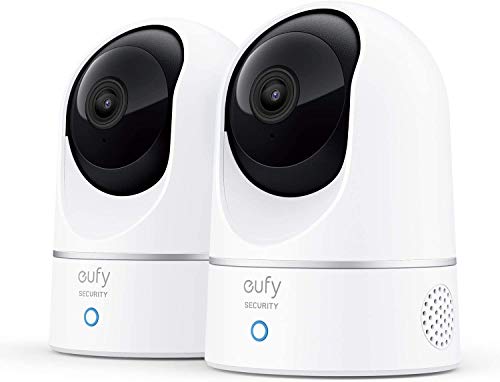
eufy Indoor Cam E220 2-Cam Kit (2K, Pan & Tilt)
Local storage first, no mandatory cloud, 2K resolution
Check price on Amazon5. Logitech Circle View, Best for Apple HomeKit Users
If your home runs on Apple HomeKit, the Logitech Circle View is the best-supported camera available. HomeKit Secure Video processes all footage locally on your Apple TV or HomePod hub rather than on Logitech's servers, which is one of the strongest privacy architectures available in consumer cameras. No subscription is required for full video history (iCloud storage applies to your existing plan). The 1080p HDR quality is excellent.
Best for: Apple HomeKit households, privacy-first families using the Apple ecosystem.
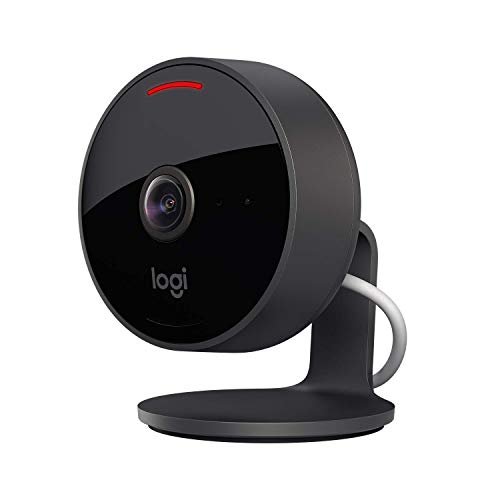
Logitech Circle View
HomeKit Secure Video, local processing, no subscription required
Check price on Amazon6. Blink Mini 2K+, Best Compact Plug-In
The Blink Mini 2K+ is a compact plug-in camera small enough to sit on a bookshelf or kitchen counter without drawing attention. The 2K resolution is a clear step up from the older 1080p Mini, night vision is solid for evening pickups, and the Sync Module (required for local storage) enables microSD recording without any subscription. For an Alexa household, feeds pull up on an Echo Show by voice.
Best for: Renters who cannot run cables, families who want flexible placement.

Blink Mini 2K+ Indoor Camera
Battery powered, 2-year life, no-subscription local storage
Check price on Amazon7. Ring Indoor Cam 2-Pack, Best Amazon Echo Integration
The Ring Indoor Cam integrates seamlessly with Amazon Echo devices, allowing you to view the camera feed on an Echo Show display or ask Alexa to pull up the camera. For families with Echo devices already in the home, this is a natural fit, and the current listing is a 2-pack, so one order covers two rooms. The $4/month Ring Protect subscription is required for video history beyond the live view. The 1080p video is clear and the setup is fast.
Best for: Amazon Echo/Alexa households who want camera-to-display viewing.
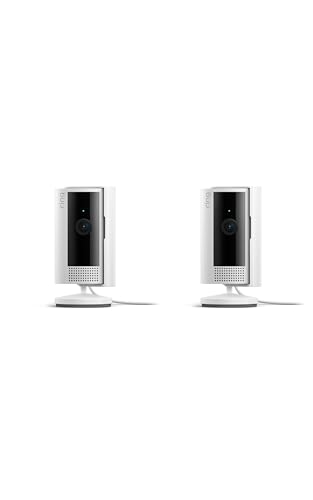
Ring Indoor Cam (2-Pack)
Alexa integration, Echo Show compatible, fast setup
Check price on Amazon8. Reolink E1 Pro, Best High Resolution Budget Camera
The Reolink E1 Pro offers 5MP resolution (higher than 1080p but lower than 4K) with pan-and-tilt range that covers an entire room from a single camera. Local microSD storage and NAS (network-attached storage) support means no subscription and complete local control of your footage. The app is functional but less polished than Arlo or Nest. For technically-inclined parents who want high resolution and full local control, the Reolink is the best value.
Best for: Tech-savvy parents who want high resolution and full local footage control.

Reolink E1 Pro
5MP, pan and tilt, local NAS storage support, no subscription
Check price on AmazonBuyer's Guide: Nanny Cam Selection and Legal Considerations
Is It Legal to Have a Nanny Cam?
In the United States, video recording in your own home is legal in all 50 states. Audio recording laws vary, some states (California, Connecticut, Florida, Illinois, Maryland, Massachusetts, Michigan, Montana, Nevada, New Hampshire, Oregon, Pennsylvania, Washington) require "all-party consent" for audio recording. If you are in a two-party consent state, audio recording without your nanny's knowledge may be illegal.
The practical recommendation: Disclose to your nanny that cameras are present in the home. Most employment attorneys and childcare professionals recommend transparency, it builds trust, sets clear expectations, and eliminates the legal ambiguity around audio recording consent.
Where to Place Nanny Cameras
Effective placement areas:
- Main living room or playroom (where most supervised time occurs)
- Kitchen (during meal preparation and feeding)
- Infant nursery (near but not directly over the crib)
Areas to avoid:
- Bathrooms (illegal to record in virtually all jurisdictions)
- Bedrooms (legally complex and an invasion of caregiver privacy during sleep)
- Areas where the camera would primarily capture other adults (neighbors, delivery persons)
Disclosing the Camera to Your Nanny
Many childcare professionals recommend full disclosure, telling your nanny that cameras exist in common areas. Disclosure prevents legal complications, demonstrates respect, and typically does not affect the nanny's behavior if they are acting appropriately. Include camera disclosure in your nanny work agreement.
Local Storage vs. Cloud Storage
Cloud storage advantages: Footage is accessible from anywhere, cannot be deleted by someone in the home, and survives camera theft or damage.
Local storage advantages: Footage does not leave your home network, no subscription cost, no company has access to your family's video.
For nanny monitoring specifically, local storage is typically preferred for privacy reasons. Most families are reviewing footage on their home network rather than remotely.
Frequently Asked Questions
Q: What is the best nanny cam?
A: For most homes, the Arlo Essential Indoor Camera 2K 2-camera kit (under $100) is the best nanny cam: it has a physical privacy shield, 2K video and local storage without a required subscription. The Wyze Cam v4 (under $50) is the best budget pick, and the eufy E220 2-camera kit (under $250) is the pick if you want pan and tilt.
Q: Where should I put a nanny cam?
A: Put cameras in shared rooms where care happens: the nursery, the main play area and the kitchen. Never place a camera in a bathroom or in the caregiver's private bedroom, and mount it high enough to see the whole room without being knocked over.
Q: Do I need to tell my nanny about the camera?
A: Legally, it depends on your state and whether the camera captures audio. Practically, most childcare attorneys recommend disclosure for audio-recording cameras in all-party consent states. For video-only monitoring, disclosure is not legally required in most states but is widely recommended as good professional practice.
Q: What resolution do I actually need for a nanny cam?
A: 1080p is adequate for identifying faces and interactions at typical room distances. 2K or higher becomes meaningful in larger rooms or when you need to read text (medication labels, what a child is eating). 4K is generally overkill for indoor close-range monitoring.
Q: How do I check the camera footage without my nanny knowing I am watching?
A: All cameras with live viewing apps allow passive monitoring at any time. For reviewing specific events, the app's event timeline or timeline scrub lets you check any time window without alerting anyone in the home. The cameras do not indicate when the live view is being accessed.
Q: Can my nanny see if I am watching the live feed?
A: Standard cameras do not notify anyone in the home when the live feed is being viewed. Some cameras have indicator lights that show the camera is "on", check your specific camera's LED behavior if discrete monitoring is important.
Q: What happens if a nanny finds and disables the camera?
A: A nanny who deliberately disables or covers a camera has almost certainly violated the terms of employment and potentially the work agreement. Document the incident and address it directly as a work performance issue. Some parents use multiple cameras as a precaution.
Q: Is a fake or dummy camera effective for nanny monitoring?
A: No. A fake camera provides zero monitoring capability. If an incident occurs, you have no footage. The peace of mind value of knowing you have actual footage far exceeds whatever deterrent effect a dummy camera might provide.
Q: How long should I store nanny cam footage?
A: Most parents review footage only when they have a specific concern rather than monitoring daily. Storage on a 32-64GB microSD card at standard quality covers 7-14 days of continuous recording. Unless there is a specific incident requiring documentation, most families do not need to archive footage long-term.
Q: Can I use a baby monitor as a nanny cam?
A: Standard baby monitors show a single feed that anyone with the receiver can watch -- there is no app access or footage review. Dedicated nanny cameras with app connectivity, motion-triggered recording, and timeline review are significantly more useful for childcare monitoring purposes.
Sources
- Manufacturer spec pages and Amazon listings for each camera (prices checked this update and they change often)
- State audio-recording consent laws: check your state attorney general or statute, since rules differ for audio and video
Researched from manufacturer specs and owner reviews, not hands-on testing. Not legal advice.
Key Takeaways
- The Arlo Essential Indoor Camera is the best overall nanny cam for most families, under $100 for a two-camera kit
- The Wyze Cam v4 is the best budget option at under $50 with surprisingly good 2.5K quality
- Always check your state's audio recording laws before relying on two-way audio features
- Disclosing camera presence to your nanny is the professionally recommended approach in most situations
- Local microSD storage provides privacy advantages over mandatory cloud subscriptions
- Place cameras in common supervised areas only, never in bathrooms or bedrooms
Related guides you may find helpful:
Written by
ChildCarePath Team
Our team is dedicated to helping families find quality child care options through well-researched guides and resources.
Related Guides
Back-to-School Daycare Checklist 2026: Everything to Buy Before Day One
The complete back-to-school shopping list for daycare and preschool: nap mat, backpack, lunch box, labels, and the big-ticket gear. Every item is a researched top pick with current prices.
Best Breast Pump for Going Back to Work 2026: Top Picks for Daycare Moms
The best breast pump for going back to work in 2026 is the Spectra S1 Plus. We compared 6 top pumps from Spectra, Elvie, Medela, Momcozy, and Willow for working and pumping moms.
Child Care Ratios by State 2026 and NAEYC Ratios
Staff-to-child ratios for all 50 states and DC: infants 1:3 to 1:6 (1:4 in most states), toddlers 1:4 to 1:11, 4-year-olds 1:8 to 1:18, plus NAEYC ratios and group sizes.
Daycare Cost by State 2026: Average Annual Infant Care Prices
Average annual cost of infant daycare by state for 2026, from $6,800 in Mississippi to over $28,000 in Washington, D.C. Compare all 50 states plus D.C. with published Child Care Aware and EPI data.
Every Child Care Option Available to Colorado Families in 2026
Explore every child care option in Colorado for 2026 — from nannies and au pairs to Head Start and family care. Compare costs, pros, cons, and how to choose.
Best Daycare Labels and Name Tags 2026: Top 8 Picks
Find the best daycare labels and name tags for 2026. We reviewed 8 top options (Mabel's Labels, Name Bubbles, Avery and more) with a comparison table and buyer's guide.