Nanit Smart Baby Monitor Review: Great Camera, Real Subscription (2026)
A Nanit smart baby monitor review: overhead 1080p video, automatic sleep tracking, multi-caregiver access, the Insights subscription, Wi-Fi dependence, and what a monitor cannot do.
The Nanit is the baby monitor to buy if you want a genuinely good overhead camera plus sleep pattern data, and you accept a subscription as part of the deal. Skip it if you want a monitor that works forever with no account, no cloud and no recurring cost, where the Infant Optics DXR-8 PRO is the honest recommendation.

Nanit Smart Baby Video Monitor, Camera and Floor Stand, 1080p Wi-Fi Camera
Overhead 1080p Wi-Fi camera with automatic sleep tracking, customisable motion and sound alerts, room temperature and humidity, multi-caregiver access, and a choice of floor stand or wall mount.
Check price on AmazonBefore anything else: a monitor is a window, not a safeguard. No baby monitor prevents sleep-related infant death. What reduces risk is back sleeping for every sleep, a firm and flat surface, a crib containing nothing but a fitted sheet, no pillows, positioners, wedges, bumpers or toppers, and room sharing without bed sharing in the early months. Buy a monitor because you want to see and hear your baby, not because you want a safety net.
With that established, the Nanit is very good at being a window. The overhead angle is the thing that separates it from a shelf camera: you see the whole crib and the whole baby rather than a partial side view, and that is what makes its sleep tracking possible at all.
Nanit at a glance
| Spec | Nanit Smart Baby Monitor |
|---|---|
| Video | 1080p HD over Wi-Fi, live stream to phone |
| Mounting | Floor stand included; wall mount option |
| Sleep features | Automatic sleep tracking and routines via Nanit Insights |
| Environment | Room temperature and humidity tracking |
| Alerts | Customisable motion and sound notifications |
| Sharing | Multiple users with permission controls |
| Ecosystem | Works with Alexa and Google Home |
| Budget | Under $500 |
Specifications above come from Nanit's published product information. Confirm current pricing and subscription terms before buying.
Where it falls short
The honest weakness is that the good part is rented. The camera works without a subscription, but the reason most people choose Nanit over a cheaper Wi-Fi camera is the sleep analysis, and that lives behind Nanit Insights. A free trial ships with the unit. After it, the feature set you evaluated the product on is a recurring line in your budget. That is not hidden, but it is easy to under-weight at the point of purchase, and published owner reviews are full of people who felt the value dropped when the trial ended.
The second weakness is Wi-Fi dependence. When the network drops, the monitor drops. A closed-signal monitor keeps working through a router reboot, an outage or a holiday rental with terrible internet. If you travel with a monitor, this matters more than the specification sheet suggests.
Third, an internet-connected camera in a nursery is a security surface. Nanit supports account controls and permissions, and you should use them: unique password, two-factor authentication where available, firmware updates, and deliberate caregiver access. This is manageable rather than alarming, but it is not zero.
What owners consistently report
Summarising the consensus of published owner reviews rather than any use of our own: video quality and the overhead angle are the standout positives, along with how useful shared access is when a partner, grandparent or nanny needs to look in. Parents returning to work mention the multi-caregiver feature specifically.
The recurring complaints are subscription cost, occasional app and connection instability, and the physical footprint of the floor stand in a small nursery. A number of owners also note that sleep analytics are more interesting in the first two months than they are later, which is worth weighing against an annual subscription.
Who it suits
- Parents who want sleep pattern data and will use it to shape routines.
- Households where several caregivers need access to the same camera.
- Anyone who values an overhead view of the whole crib.
- Families already comfortable with connected cameras in the home.
Who should skip it
- Anyone who does not want a Wi-Fi camera or a cloud account in the nursery.
- Families travelling often, where a closed-signal monitor is more dependable.
- Buyers unwilling to pay a subscription, who should consider a eufy indoor camera or the Infant Optics DXR-8 PRO.
- Parents whose real question is about the baby's readings rather than the room, who should read our Owlet Dream Sock review instead.
The rest of the sleep space
The monitor is the last decision, not the first. Get the surface right: a firm, flat mattress such as the Newton, a fitted sheet, nothing else in the crib. Use a wearable blanket like the Woolino sleep sack instead of loose bedding. If you are also setting up a bedtime routine, our Hatch sound machine review covers the other half of that. For what a daycare infant room must do, see the childcare safety checklist and daycare nap and sleep policies.
Alternatives worth comparing
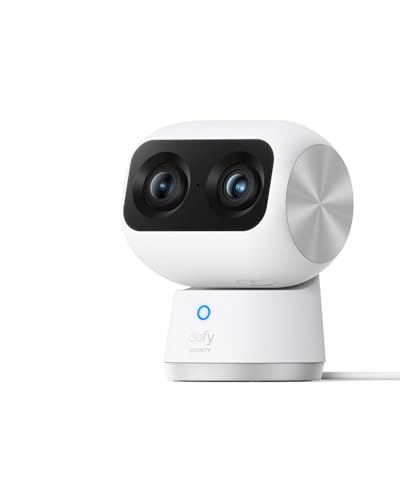
eufy Security 4K Indoor Cam S350, No Subscription, Dual Cameras, 8x Zoom
Better on running cost. A high-resolution pan and tilt indoor camera with local storage and no required subscription, though it gives you no sleep analytics.
Check price on Amazon
Infant Optics DXR-8 PRO, 5 inch HD Video Baby Monitor, No WiFi
Better on privacy and travel reliability. A direct closed signal to a dedicated screen, active noise reduction, and a user-replaceable battery.
Check price on Amazon
VTech Smart WiFi Baby Monitor with 2 Cameras, 1080p Split Screen
Better for two children. Two cameras with split screen on a 5 inch parent unit plus app access, at a lower price than one Nanit.
Check price on AmazonThe head-to-heads are Nanit vs eufy indoor camera and Owlet Dream Sock vs Nanit.
Buying notes
Work out the subscription cost over a year and add it to the purchase price before you compare. Set up strong credentials and two-factor authentication on day one. Mount it so no cord can reach the crib, which is a genuine strangulation hazard with any nursery camera. And if your baby seems unwell, act on what you can see rather than on what an app reports; any fever in an infant under three months warrants prompt medical contact.
This review draws on Nanit's published product information and the consensus of published owner reviews. We have not tested this product ourselves. This is researched information and not medical advice; speak to your paediatrician about anything concerning your baby. As an Amazon Associate we earn from qualifying purchases, at no extra cost to you.
Frequently Asked Questions
Does the Nanit need a subscription?+
The camera streams live video without one. Nanit's sleep analysis features, including auto-captured moments and the fuller Sleep Plan, sit inside Nanit Insights, which ships with a free trial and becomes a paid subscription afterwards. Decide before you buy whether the sleep analytics are the reason you want it, because that is the part you keep paying for.
Can a baby monitor prevent SIDS or sleep-related death?+
No. No camera, sock, mat or wearable has been shown to prevent sleep-related infant death, and none replaces safe sleep practice. Place your baby on their back for every sleep, on a firm flat surface, in a crib containing nothing but a fitted sheet, and share a room without sharing a bed for the early months. A monitor shows you the room. That is all it does.
Is the Nanit secure, and can it be hacked?+
Nanit is a Wi-Fi camera with cloud services, so it carries the risks any internet-connected camera carries. Use a unique strong password, turn on two-factor authentication if offered, keep firmware updated, and be deliberate about who you grant caregiver access to. If the idea of an internet-connected camera in a nursery bothers you at all, a closed-signal monitor such as the Infant Optics DXR-8 PRO removes the question entirely because there is no app, no cloud and no account.
What does Nanit sleep tracking actually measure?+
It derives sleep and wake patterns from the overhead camera view rather than from anything attached to your baby, and it reports room temperature and humidity from the unit. That makes it useful for spotting patterns and wake windows. It is not a medical measurement of anything, and it should not be used to decide whether a baby who seems unwell is fine.
Nanit or eufy indoor camera: which is better for a nursery?+
Nanit is purpose-built for a crib, with the overhead mount, sleep tracking and a nursery-focused app. A eufy indoor camera is a general-purpose security camera that costs less and usually runs without a subscription, but it will not give you sleep analytics. Our Nanit vs eufy indoor camera comparison sets out which trade-off suits which household.
Written by
ChildCarePath Team
Our team is dedicated to helping families find quality child care options through well-researched guides and resources.
Related Guides
Abiie Beyond Junior Review: The High Chair That Becomes a Chair (2026)
An Abiie Beyond Junior wooden high chair review: 20-second conversion, dual 5-point and 3-point harness, wipeable cushions, and whether it beats a budget folding chair.
Graco 4Ever DLX Review: Ten Years of Seat, If You Install It Right (2026)
A Graco 4Ever DLX car seat review: four modes from 4 lb rear-facing to 120 lb backless booster, the bulk problem, expiry dates, and why installation matters more than the seat you buy.
Graco Pack 'n Play On The Go Review: The Second Sleep Space Most Families Need (2026)
A Graco Pack 'n Play On The Go review: full-size bassinet, compact fold, safe use of the bassinet stage, and when to pay three times more for a travel crib instead.
Guava Family Lotus Travel Crib Review: The One That Fits in a Backpack (2026)
A Guava Family Lotus travel crib review: 15 lb backpack fold, GREENGUARD Gold certification, the zip side door, and whether a premium travel crib beats a budget playard.
Halo SleepSack vs Woolino: Which Wearable Blanket? (2026)
Halo's cotton sleep sacks are cheap enough to own several; Woolino's merino adapts across seasons. Compare TOG ratings, sizing and safe sleep temperature guidance.
Infant Optics DXR-8 PRO Review: The Monitor That Never Touches the Internet (2026)
An Infant Optics DXR-8 PRO review: no Wi-Fi, no app, active noise reduction, interchangeable lenses and a replaceable battery. Where the closed-signal design wins and where it costs you.